Construction & trades
Websites for contractors that get you onto the tender list
Before a main contractor invites you to price, someone checks your website. They're looking for one thing — what you're accredited to, at what tier, and whether it's still in date. Most contractors' sites make that the hardest thing to find.
Get my build plan →
The problem
Your website is a prequalification document. It just isn't written like one.
A QS deciding whether to add you to a tender list will spend ninety seconds on your site. They aren't reading about your values. They're checking whether you clear the gate — and if they can't tell in ninety seconds, they move to the next firm.
- Accreditation logos in the footer with no tier and no date. A CHAS badge doesn't say whether it's Standard, Advanced or Elite — and those satisfy different tenders. A QS assumes the lowest, or assumes it's lapsed.
- "PAS 91 accredited" still on the site. BSI withdrew PAS 91 in April 2023. The Common Assessment Standard replaced it, and public-sector procurement moved to CAS under PPN 03/24.
- One contact form for everything. A homeowner wanting a loft conversion and a main contractor sending a tender invitation land in the same inbox, in the same format, with the same urgency.
- No project list a buyer can check. Value, sector, duration, and who the client was. Without it there's nothing to assess you on but the photographs.
- Accreditations shown with the tier and the renewal date. "CHAS Elite, renewed March 2026" answers the question. A logo doesn't.
- Current scheme names, and a note when a standard changes so the site doesn't quietly go stale.
- Two routes on the enquiry — domestic and commercial — that ask different questions and go to different places.
- A project list with the facts a buyer prequalifies on: value band, sector, duration, and the role you held.
How it plays out
A Tuesday, 4pm
A tender invitation and a kitchen extension, arriving twenty minutes apart, handled completely differently.
What your enquiry form captures
Two enquiries, two forms
The first question is which kind of enquiry this is, because everything after it differs. One general contact form serves neither well.
The pages
What a contractor's site actually needs
Eight pages. Two of them exist for the buyer, not the homeowner.
Connects to
What contractors usually wire in
Chosen for this work, not a list of everything we can connect.
Pricing
Published, so you don't have to ask
Studio
A strong, well-built site without bespoke design work.
then £69 per month
- Up to 8 pages
- Enquiry form designed around your business
- Google Business Profile setup
- One revision round
Signature
Where the website is a working part of how the job comes in.
then £89 per month
- Up to 12 pages, including area pages
- The integrations above, wired and tested
- Automated acknowledgement on every enquiry
- Migration with search positions kept
Three standard integrations are included. See what counts as one.
Enquire →Questions
What contractors ask us
Can you get us CHAS or Constructionline?
No — that's an assessment you go through with the scheme, and anyone offering to shortcut it is selling something you shouldn't buy. What we do is make what you already hold easy for a buyer to verify: scheme, tier, certificate number and renewal date, on a page they can find in one click.
Our site says PAS 91. Is that a problem?
It's out of date. BSI withdrew PAS 91 in April 2023 and the Common Assessment Standard replaced it — public-sector procurement moved to CAS under PPN 03/24. Some tenders still use the old wording, so it's not that you've done anything wrong. But a QS who knows the schemes will read it as a site nobody has looked at in three years, and that's the impression you least want on the page they're prequalifying you from.
Why show renewal dates? Isn't that a hostage to fortune?
It's the opposite. A badge with no date makes a buyer assume the worst, because the sites that hide the date are usually the ones whose accreditation lapsed. A date that's current answers the question outright. We build in a reminder before each one expires so it doesn't catch you out.
We mostly do domestic. Do we need the commercial side?
Only if you want commercial work, now or later. The split costs nothing to build in and it's much harder to retrofit once the site is live and ranking. If you're purely domestic we'll leave it out and say so at Discovery.
Can people upload drawings?
Yes, on the commercial route. A tender enquiry without documents is a phone call you have to make before you can start, and that phone call is usually a day later than it needed to be.
How long does it take?
Three phases — Discovery, Build, Launch. Gathering the project information is usually the slow part, because it lives in someone's head or a folder nobody has opened since handover. We'll tell you at Discovery what we need and you'll know immediately if anything slips.
Do we own it?
Yes. The domain is registered in your company's name, not ours, and transfers free on request. If you leave, the site leaves with you.
Also from the studio
Keep looking
Get a build plan for your firm
Five questions and we'll send the pages, what the enquiry form should capture, and a fixed price. No obligation and no call unless you want one.
Get my build plan →Sample site
Wireframe from Discovery, then the finished build
The wireframe is agreed before anything is designed. Press the button to see what it became.Groundworks and civils
Wireframe agreed at Discovery
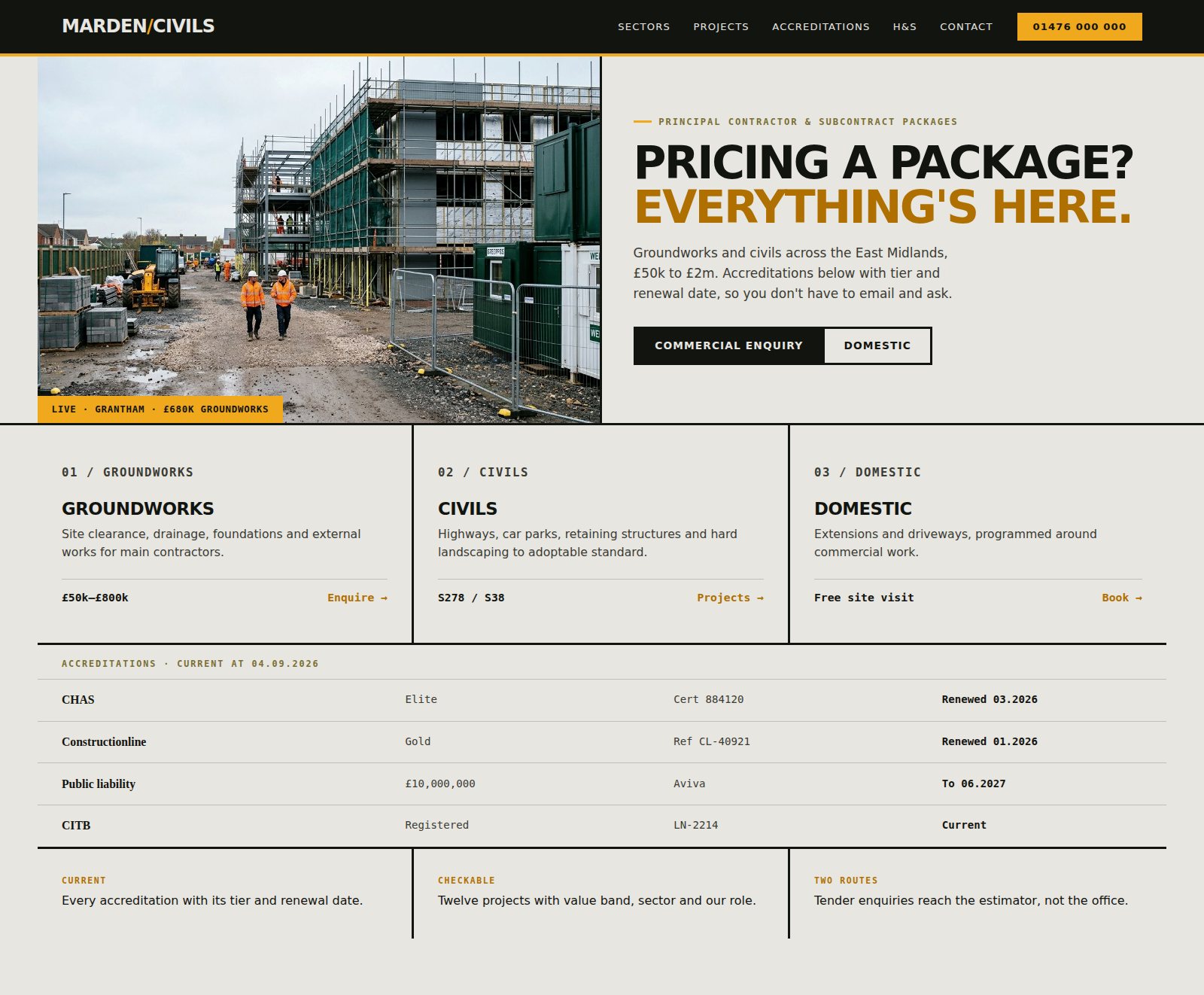
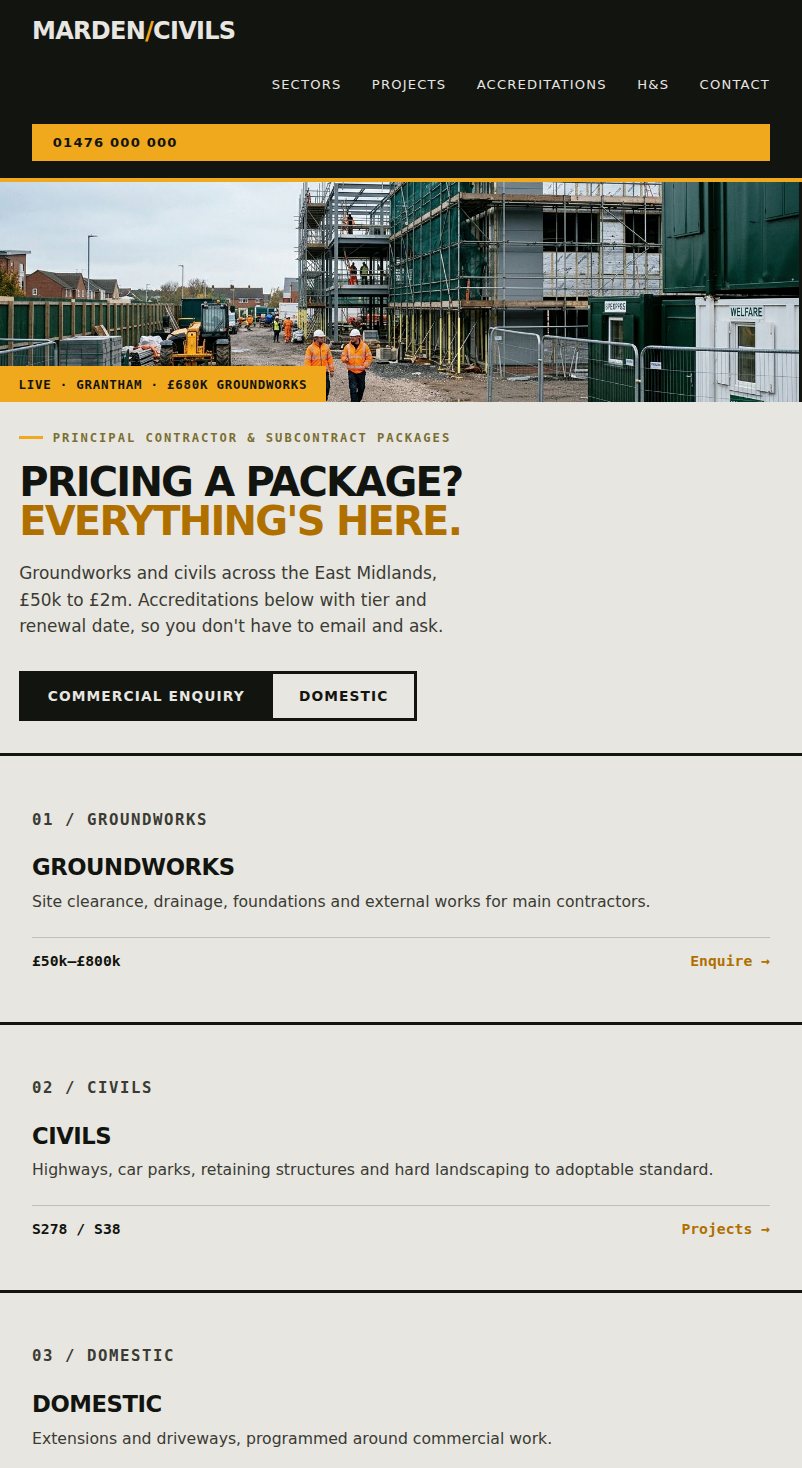
Every build starts from a wireframe you have already agreed. Nothing is designed before that.
Get my build plan →